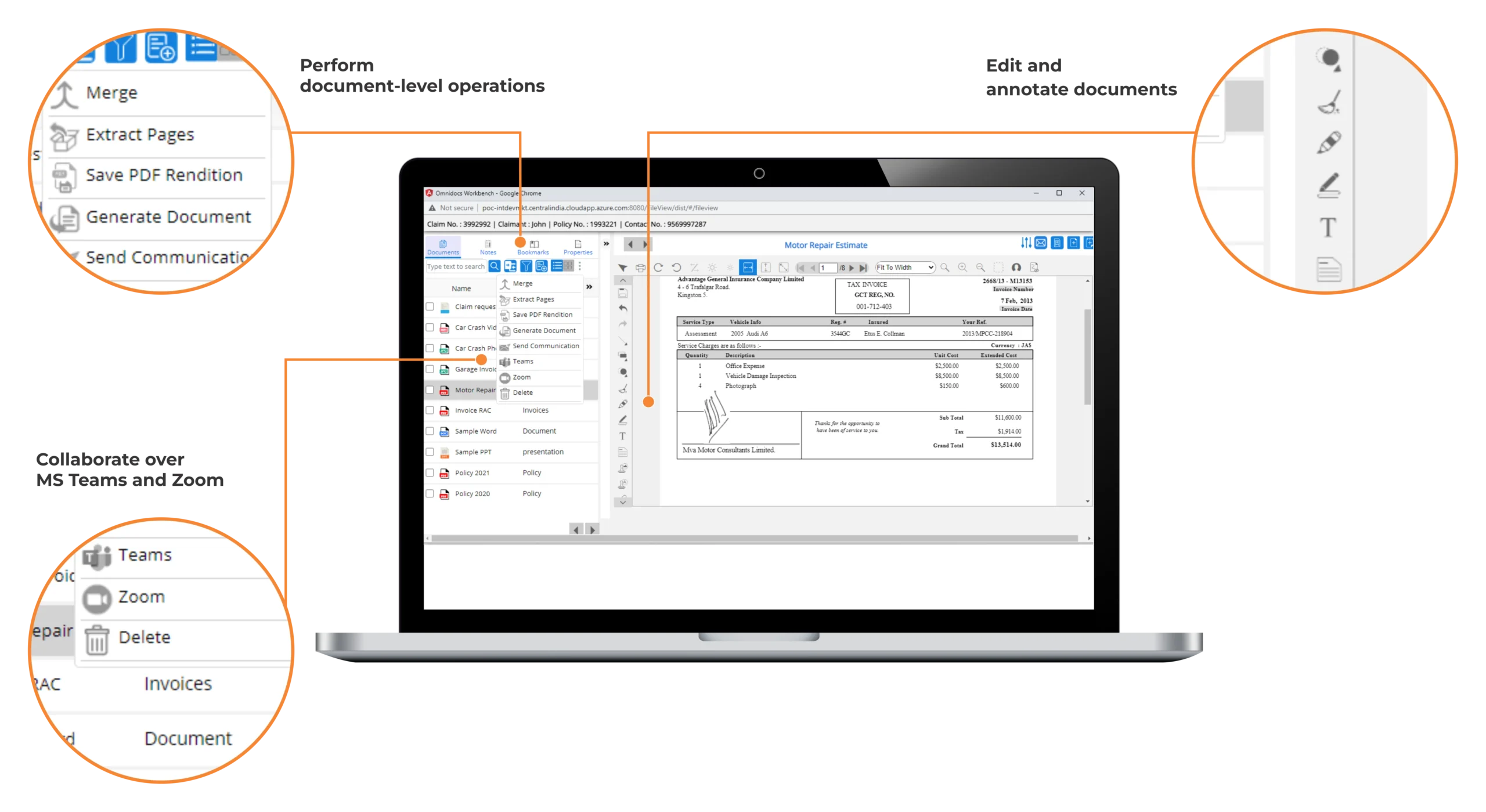
Document Management: OmniDocs (DMS)

OmniDocs is an Enterprise Document Management (EDM) Engine to capture, manage & deliver large volume of data.

OmniDocs is an Enterprise Document Management (EDM) tool that helps users to create, capture, manage, deliver and archive heavy volumes of data. It has a significant capability to seamlessly integrate with other organizational applications.

Overview

OmniDocs is an Enterprise Document Management (EDM) platform for creating, capturing, managing, delivering and archiving large volumes of documents and contents. It also integrates seamlessly with other enterprise applications.

OmniDocs handles Scanned Document Images, Electronic Documents, Emails and Electronic Data Output from other applications with equal efficiency and ease.

OmniDocs seamlessly collaborates, communicates and shares knowledge across and beyond the Enterprise. With capabilities to efficiently handle enterprise-wide content and ease of integration with legacy systems, OmniDocs is a true Enterprise Content and Document Management solution. OmniDocs is certified for integration with SAP Netweaver.

OmniDocs Components

OmniDocs Server

OmniDocs Server is built using J2EE standard and Service Oriented Architecture (SOA).It exposes consolidated functionality-level, XML-based API for easy integration with client applications. OmniDocs Server is responsible for Transaction Management, Connection Pooling and Session Management. It provides unparalleled fault tolerance and Scalability.

OmniDocs Web Desktop

OmniDocs Web Desktop is a web-based client that enables enterprises to access, share and collaborate documents across the organization. The main features include:

  • Filing of folders/images
  • Indexing, Processing and searching
  • Various monitoring reports like usage reports, audit reports, etc
OmniProcess for File Processing

OmniProcess is the integrated workflow designing module in OmniDocs web desktop. OmniProcess helps create a maker-checker workflow for file creation by the maker' and then quality check, document verification and authorization by the 'checker'. Omni Process supports multiple levels of authentication for a multi-user environment for file processing. It also provides form based indexing support.

OmniProcess provides the user with features such as searching, processing and viewing the documents of a transaction.

It supports all standard browsers like Internet Explorer and Mozilla (on Windows, Linux and other platforms).

OmniDocs Image Server

The Image Server consists of a Centralized Image Database (Image Server Database). Image Server is responsible for storage and retrieval of documents. It enables document lifecycle management, moving documents from online to offline storage, data caching, replication etc. It is highly scalable, and can support billions of documents and terabytes of data.

OmniDocs Remote Image Server (Optional)

This server is used for optimizing bandwidth for movement of images between two or more locations. This server works on concept of replicating/copying documents from one location to other location in off peak hours for bandwidth utilization. Server can be configured for immediate replication as well as delayed replication. Images can be scanned and uploaded locally into image server and later can be replicated to central/remote location.

OmniDocs Storage Management Server (SMS)

Storage Management Server manages the actual storage and retrieval of Image Data. Multiple SMS can be deployed for a single Image Server. Typically, this happens for achieving scalability/availability or at multiple locations for bandwidth management.

OmniDocs Text Extraction Manager (For Full Text Search)

This component extracts data from images and enables OmniDocs to perform Full Text search. This allows the user to search documents based on the presence of a particular text in the document.

CSV Import Utility

Used for importing documents & folders in bulk with indexing.

LDAP Authentication Service

Integrates OmniDocs with Directory Services for user authentication with single signon support. The supported directory services are Windows Active Directory, Novell Directory and Sun Directory server.

Architecture

Built around a robust industry-standard n-tier J2EE architecture with native XML capabilities, OmniDocs provides unmatched Scalability, Integration Capability and System Availability. OmniDocs supports Enterprise-wide deployment by deploying multiple Transaction Servers, replicating Image Servers and load balancing Web Servers. OmniDocs has easy to use XML APIs and Web-Services interfaces to facilitate integration with other business systems like Workflow, ERP, CRM & other Business Applications.

Sample text for daigram

Benefits:

  • Managing Content Chaos
    • File & Archive Documents in folder hierarchy.
    • Import different document types
    • No Risk of Losing Documents
  • Fast Document Search
    • Efficient Search across Geographic Locations
    • Web based anywhere access to the Documents
  • Reducing Enterprise Cost
    • Centralized processing
    • educe File Processing time
    • Free Premium Physical Storage
  • Audit & Compliance
    • Adherence to regulatory and internal standards
    • Record Management Policies
    • E-Discovery & Legal Hold
  • Collaboration
    • Sharing Documents with external Partners
    • Internal Knowledge Repository
    • Document availability across geographic locations
  • Green IT
    • Less Paper Processing
    • Electronic Document Routing
    • Minimize Printed Copies

Features:

  • Unified repository for all documents and folders across the organization including electronic files, paper images and physical documents
  • Comprehensive document Scanning, Indexing and Storage
  • Indexing on custom fields at Folder/Document level
  • Maker-Checker features for dual authorization in user/group operations
  • Comprehensive reports for monitoring
  • Configurable password policies
  • Comprehensive and easy to set Access Rights control with inheritance
  • Specific rights at document level for sharing
  • File processing workflow
  • Full text and strong index based search
  • Annotations on Image and Electronic documents
  • Document Check-in, Check-out & Version Control
  • Extensive audit reports and Audit Trails
  • HTTPS support for security
  • Server Replication for low bandwidth consumption at multi-location installations
  • Server clustering for enterprise-class Scalability
  • Unicode support

General use of OmniDocs

Document Archival

Document ArchivalOmniDocs is an Enterprise Content Management system for creating, capturing, managing, delivering, and archiving large volumes of documents and content. OmniDocs handles scanned document images, electronic documents, emails, and electronic data output from other applications with equal efficiency and ease.

OmniDocs supports production level scanning of documents and automatic filing into DMS through OmniScan. Access rights, privileges, user authentication and an option for single sign on through LDAP provide controlled access to folders and documents across the enterprise. OmniDocs supports deployment in a distributed environment. The highly scalable architecture of OmniDocs provides a flexible environment to match the increasing demand of the business. Structured document indexing enables faster retrieval of documents.

Omnidocs for content management

OmniDocs extends the scope of imaging to include electronic documents such as contracts, proposals, reports and emails for collaborative working. OmniDocs seamlessly integrates with document creation applications and delivers enterprise wide availability, version control, annotations and access control for all forms of electronic content including scanned images.
OmniDocs makes content easier to save, search and reuse. OmniDocs helps in managing the content throughout all phases of its life cycle with strong indexing, interlinking of documents and rights management features. OmniDocs ensures content security and accuracy and thereby helps in reducing enterprise risks. OmniDocs provides comprehensive reporting tools which helps the administrators to generate reports and track the proceedings of the content across the organization. Strong password configurability and maker-checker features allow the administrators to maintain the authenticity of users, thereby helping maintain the integrity of information stored in OmniDocs.

For Sales Inquiries

Americas: +1 (202) 800 7783 | Europe: +44 (0) 2036 514805 | Middle East: +973-1-619-8002 | Africas: +973-1-619-8002 | India: +91 11 40773769 | Asia Pacific: +65 3157 6189

Search Newgen For More Information on Document Management: OmniDocs (DMS)